Showing posts with label Adobe Software. Show all posts

13 Jul 2016

Adobe Photoshop CC2015.5_v17.0_x64 For Windows Size(1.28GB)

ကြန္ပ်ဴတာအတြက္ Adobe Photoshop CC2015.5_v17 ကိုတင္ေပးလိုက္ပါတယ္။ဒီ Adobe Photoshop CC2015.5_v17 ကေတာ့ Windows OS 64Bit အတြက္သာျဖစ္ပါတယ္။လိုအပ္သူမ်ားဆြဲယူထားႏိုင္ပါျပီ
 Features of Adobe Photoshop cc 2015 Full Crack:
    Faster, easier image export.
    Easily print your 3D content.
    Art boards for efficient design.
    Streamline complex 3D models.
    Adobe Camera Raw 9.1 improvements.
    Quickly find the perfect image or graphic.
    Better panoramas with Content-Aware Fill.
    Adobe Photoshop CC 2015 Crack
    Get more genuine blurs with additive noise.
    Move and extend objects with more control.
    Automatically create bump maps from images.
    Edit once, update everywhere with Linked Assets.
    Streamlined and optimized experience for designers.
    Better viewing experience on Windows HiDPI displays.
    Be sure your Photoshop designs look good on iOS devices.
    Add more layer styles to get the professional look you want.
Password = www.aungkyawthu.net
https://939a4e4038e29e08fadc2090d8aab7fed3138c09.googledrive.com/host/0B6x6THVC0C2IVDMxSTZRaFBRSDQ/Adobe/Adobe%20Photoshop%20CC2015.5_v17.0_x64.rar
ကြန္ပ်ဴတာေဆာ့ဝဲမ်ားစုစည္းမႈ  www.aungkyawthu.net

9 Dec 2015

ဗြီဒီယိုတည္းျဖတ္တဲ့ေဆာ့၀ဲလ္ေတြထဲမွာ နာမည္ၾကီးတစ္ခုျဖစ္တဲ့ Adobe Premiere Pro CC


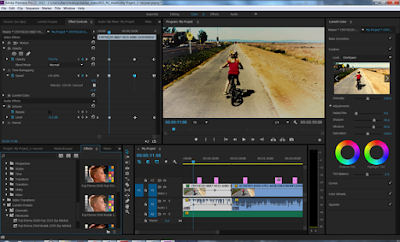
Adobe Premiere Pro CC 2015 9.1.0 ေနာက္ဆံုးထြက္ Update ေလးပါ..။ ဒါကေတာ့ ရုပ္သံ၊ တည္းျဖတ္၊ video effect ေတြကို ဝါသနာပါတဲ့ မိတ္ေဆြမ်ား ဒီ Adobe Premiere Pro CC 2015 9.1.0 ေဆာင္ထားလိုက္ပါ။ Program ေတြ update ျဖစ္လာတာႏွင့္အမွ် အထဲမွာပါ၀င္လာတဲ့ Tools ေတြဟာလည္း ပုံစုံလာသလုိ ပုိျပီးေတာ့လည္း လြယ္ကူလာပါတယ္။ ခုေနာက္ပုိင္း adobe product ေတြမွာဆုိ လုပ္လုိ႔မရတာ မရွိသေလာက္ကုိ စုံလာပါတယ္။ Full Version သံုးရေအာင္ Crack key ဖိုင္ ထည့္ေပး ထားပါတယ္။ အေသးစိတ္ကိုေတာ့ ေအာက္မွာ ဆက္လက္ေလ့လာနိုင္ပါတယ္။ ဖိုင္ဆိုဒ္ကေတာ့ 1.10 GB ရွိၿပီး Windows XP / Vista/ 7/ 8/ (64-bit) အထိ အသံုးၿပဳနိုင္ပါတယ္။  Adobe Premiere pro အသံုးၿပဳနည္း စာအုပ္လိုခ်င္ရင္ (ဒီေနရာမွာ) ရယူနိုင္ပါတယ္။ အသံုးၿပဳလိုတဲ႕ မိတ္ေဆြမ်ား ေအာက္မွာ ေဒါင္းလုဒ္ ယူနိုင္ပါၿပီ။
Features Of Adobe Premiere Pro CC 2015 Full Crack
  • Can edit videos in a very easy manner.
  • The plugin system included will allow you to import a wide range of video formats.
  • 3D editing capabilities included.
  • Timeline based editing.
  • Supports Track Targeting feature.
  • GPU acceleration technology introduced.
  • Improved workflow.
  • Saves your precious time.
  • Supports a wide variety of cameras and avoids transcoding process.
  • Great integration with other Adobe applications.
System Requirements
  • Operating System: Windows XP/Vista/7/8
  • Memory (RAM): 4GB of RAM required.
  • Hard Disk Space: 4GB of free space required.
  • Processor: Intel® Core™2 Duo or AMD Phenom® II processor; 64-bit support required
How To Instal
  1. Disable your internet access
  2. Install photoshop as a trial
  3. Open the folder update and install the new updates
  4. Use the Patch “adobe.snr.patch-painter.exe” to use photoshop as a full version
  5. Done


  www.ayekyaw.org

17 Aug 2014

Adobe Photoshop CS6 Version13.0.1 With Crack

အကိုရယ္ Adobe Photoshop တင္ေပးပါလားဆိုလို႔ Adobe Photoshop CS6 ကိုက်ေနာ္တင္ေပးလုိက္ပါ
တယ္။ ဒီေကာင္းကိုေတာ့ က်ေနာ္ကိုယ္တိုင္သံုးထားတာပါ။ ေဘာေတာ္ေတြသံုးအရေအာင္အတြက္ က်
ေနာ္ ျပန္လည္းအမွ်ေ၀ေပးလိုက္တာပါ။Adobe Photoshop CS6 ကို full ျဖစ္ရန္အတြက္ေတာ့..
1. Install application from "Adobe CS6"ကိုသြားပါ။
2. ေအဒီထဲမွာSet-up.exeကိုR/C ေထာက္ျပီး Run as admin လုပ္ေပးလုိက္ပါ။
3.Adobe Photoshop CS6 (x86) and Adobe\Adobe Photoshop CS6 (64 Bit)ေမးလိမ့္မယ္။မိမိ
ၾကိုက္တာကိုေရႊျပီး ဆက္လုပ္လုိက္ပါ။
4.C:\Program Files\Adobe\Adobe Photoshop CS6 ကိုသြားျပီး ဒီ amtlib.dll စာလံုးကိုရွာပါ။
5.amtlib.dllစာလံုးကိုေတြတာနဲ႔ amtlib.dll.BAK လိုိေျပာင္းေပးလုိက္ပါ။
6.Adobe Photoshop CS6 (x86) and Adobe\Adobe Photoshop CS6 (64 Bit)ထည့္မွာမိမိက ဘာကို
ေရႊရြယ္ထားခဲ့တာလည္း မိမိေရႊထားတယ္ bit ၏cracked dll ေလးကို copy ယူပါ။
7.C:\Program Files\Adobe\Adobe Photoshop CS6 ေနရာေလးမွာ မိမိထည့္ေပးထားတယ္ bit အေပၚမွာ cracked dll ေလးကို Paste လုပ္ေပးလုိက္ပါ။
ဒါဆိုရင္ Full အျဖစ္သံုးႏိုင္ျပီးပါတယ္။
အားလံုးအဆင္ေျပပါေစ။

Download Here


14 Aug 2014

Adobe Photoshop CC Portable (32 bits, 64 bits) Full Version

Adobe Photoshop CC ကိုေတာ့ ေတာ္ေတာ္မ်ားေတာင္းဆိုထားတယ္အတြက္က်ေနာ္ ဒီတစ္ေခါက္ ေမတၱာေစဒနာထားျပီးေတာ့ တင္ေပးလိုက္ပါဗ်ာ။ေနာက္ဆံုးထြက္ Version အသစ္ေလးျဖစ္တဲ့ Adobe Photoshop CC 2014 (32 bit)(64 bit)
ကိုတျပိဳင္းနက္တင္ေပးလိုက္ပါတယ္။32-Bit အတြက္သာျဖစ္ရင္ 32 bitကိုသာေဒါင္ပါ/ တေကလိုမ်ား 64 bitဆိုရင္ 64 bitကိုေဒါင္ျပိးအသံုးျပဳနုိင္ပါတယ္ဗ်ာ။ Version အေန႔နဲ႔ေတာ့
Portableအျဖစ္တင္ေပးလိုက္ပါတယ္။
Download Here
===
32 bits Here
===

64 bits Here
===

6 Aug 2014

Adobe After Effects CC 2014 13.0.1 (LS20) Multilingual Full version

Video effect ေလးေတြလုပ္ရာမွာ ေတာ္ေတာ္ေလးေကာင္းတဲ့ေကာင္ေလးပါဒီေကာင္ေလးကို
 ေဘာ္တာေတြသီၿပီးသာေနမွာပါ။ ေတာင္းဆိုေနတဲ့လူေတြ မ်ားေနလို႔ ျပန္ရွယ္ေပးလိုက္ပါတယ္။
Version အေနနဲ႔ေတာ့ အားလံုးကိုထည့္ေပးထားပါတယ္။ 1.Keygen,2. Key, 3. Crack,  4.Patch and
Portableေတြကိုထည့္ေပးလိုက္ပါတယ္။
 Adobe After Effects CC 2014 13 software is the industry-leading solution for creating sophisticated motion graphics and cinematic visual effects. Transform moving images for delivery to theaters, living rooms, personal computers, and mobile devices.A live 3D pipeline with Cinema 4D means you can import 3D objects and use them in 3D scenes in After Effects. No re-rendering. No waiting. Just more creating.

After Effects CC (2014):

Keying effects
Preserve fine detail when keying compressed or poorly shot blue-screen or green-screen footage. Use the Advanced Spill Suppressor to control the amount of green spill left in green-screen footage.

Live Text Templates for Premiere Pro
Package your After Effects compositions as Live Text templates so Premiere Pro editors can change the text without changing the text color, motion, or lower third background.

Flexible masking options and Premiere Pro Interchange
Use masks to apply effects to specific areas of your compositions no need for additional adjustment or track matte layers and blend each effect individually into the original layer. Import masks from Premiere Pro via Dynamic Link for further refinement.

Kuler integration
Create color themes using the Adobe Kuler app on your iPhone or in your browser, and then sync your swatches to After Effects for use in your compositions.

Mercury Transmit
Get full screen previews of your composites on a separate monitor. Send previews over interfaces like HDMI from a graphics card without additional hardware.

Media Browser enhancements
Navigate your media locally or across a network via Adobe Anywhere, and access complex media types like P2 and XDCAM as media, not as nested folders.

Typekit Integration
Access a variety of fonts from Typekit for immediate use in your After Effects projects.

Panel Integration support
Find and install plug-ins, extensions, training media, and other content via After Effects panels created by the developer community.

And so much more
Also includes Faster performance in the Warp Stabilizer VFX effect the ability to import Sony RAW footage from F5, F55, and F65 cameras; scripting access to render settings and output module settings; and more.

System Requirements:
– Intel Core2 Duo or AMD Phenom II processor with 64-bit support
– Microsoft Windows 7 with Service Pack 1, Windows 8, or Windows 8.1
– 4 GB of RAM (8 GB recommended)
– 5 GB of available hard-disk space; additional free space required during installation (cannot install on removable flash storage devices)
– Additional disk space for disk cache (10 GB recommended)
– 1280 x 1080 display
– OpenGL 2.0 capable system
– QuickTime 7.6.6 software required for QuickTime features
– Optional: Adobe-certifi ed GPU card for GPU-accelerated ray-traced 3D renderer
– Internet connection and registration are necessary for required software activation, validation of subscriptions, and access to online services.

Whats new in version 13.0.1:
– May include unspecified updates, enhancements, or bug fixes.
Miscellaneous updates:
– Use File > Save As > Save A Copy As CC (12) to save a project as a copy for the previous version. To open a project created in the latest version of After Effects in After Effects CS6, you have to save back from After Effects CC (12). See Save and backup projects for detailed information.
– You can now import raw files from Sony F5, F55, and F65 cameras into After Effects. As with ARRIRAW files, the source settings are not carried over when transferring a clip from Premiere Pro to After Effects.
– After Effects CC now installs mocha-AE version 3.2.1. Previous versions of After Effects CC installed mocha-AE v3.1.0. See the release notes (pdf) on the Imagineer Systems website for details of what’s new in mocha-AE v3.2.
– You cannot export to the following formats in the 2014 version of After Effects CC. However, you can still import these file formats into After Effects.
– FLV/F4V
– MPEG-2
– H.264
– WMV
– SWF
Download Here at Solidfiles
Download Here at Usersfules

23 Jul 2014

Adobe Photoshop CC Portable (32 bits, 64 bits) Full Version

Adobe Photoshop CC ကိုေတာ့ ေတာ္ေတာ္မ်ားေတာင္းဆိုထားတယ္အတြက္က်ေနာ္ ဒီတစ္ေခါက္ ေမတၱာေစဒနာထားျပီးေတာ့ တင္ေပးလိုက္ပါဗ်ာ။ေနာက္ဆံုးထြက္ Version အသစ္ေလးျဖစ္တဲ့ Adobe Photoshop CC 2014 (32 bit)(64 bit)
ကိုတျပိဳင္းနက္တင္ေပးလိုက္ပါတယ္။32-Bit အတြက္သာျဖစ္ရင္ 32 bitကိုသာေဒါင္ပါ/ တေကလိုမ်ား 64 bitဆိုရင္ 64 bitကိုေဒါင္ျပိးအသံုးျပဳနုိင္ပါတယ္ဗ်ာ။ Version အေန႔နဲ႔ေတာ့
Portableအျဖစ္တင္ေပးလိုက္ပါတယ္။
Download Here
===
32 bits Here
===

64 bits Here
===

7 Jul 2014

Adobe Photoshop CS6 Version13.0.1 With Crack

အကိုရယ္ Adobe Photoshop တင္ေပးပါလားဆိုလို႔ Adobe Photoshop CS6 ကိုက်ေနာ္တင္ေပးလုိက္ပါ
တယ္။ ဒီေကာင္းကိုေတာ့ က်ေနာ္ကိုယ္တိုင္သံုးထားတာပါ။ ေဘာေတာ္ေတြသံုးအရေအာင္အတြက္ က်
ေနာ္ ျပန္လည္းအမွ်ေ၀ေပးလိုက္တာပါ။Adobe Photoshop CS6 ကို full ျဖစ္ရန္အတြက္ေတာ့..

1. Install application from "Adobe CS6"ကိုသြားပါ။
2. ေအဒီထဲမွာSet-up.exeကိုR/C ေထာက္ျပီး Run as admin လုပ္ေပးလုိက္ပါ။
3.Adobe Photoshop CS6 (x86) and Adobe\Adobe Photoshop CS6 (64 Bit)ေမးလိမ့္မယ္။မိမိ
ၾကိုက္တာကိုေရႊျပီး ဆက္လုပ္လုိက္ပါ။
4.C:\Program Files\Adobe\Adobe Photoshop CS6 ကိုသြားျပီး ဒီ amtlib.dll စာလံုးကိုရွာပါ။
5.amtlib.dllစာလံုးကိုေတြတာနဲ႔ amtlib.dll.BAK လိုိေျပာင္းေပးလုိက္ပါ။
6.Adobe Photoshop CS6 (x86) and Adobe\Adobe Photoshop CS6 (64 Bit)ထည့္မွာမိမိက ဘာကို
ေရႊရြယ္ထားခဲ့တာလည္း မိမိေရႊထားတယ္ bit ၏cracked dll ေလးကို copy ယူပါ။
7.C:\Program Files\Adobe\Adobe Photoshop CS6 ေနရာေလးမွာ မိမိထည့္ေပးထားတယ္ bit အေပၚမွာ cracked dll ေလးကို Paste လုပ္ေပးလုိက္ပါ။
ဒါဆိုရင္ Full အျဖစ္သံုးႏိုင္ျပီးပါတယ္။
အားလံုးအဆင္ေျပပါေစ။

Download Here


4 Jul 2014

ေရႊတဂံု Wallpaper.APK ေလးလိုခ်င္ယူဗ်ာေတာ္ေတာ္မိုက္တယ္


ေရႊတဂံုWallpaper ဗားရွင္း ၃.၁
ေအာင္ေလး နည္းပညာ www.mmtechnologies.org
မွေရးသားထားတာ ပါလိုခ်င္ရင္


14 Jun 2014

Adobe Muse CC v7.2 Build 232 Multilingual With Crack

Effect ေကာင္းေကာင္းေလး slide show design ေတြကိုေပ့ါေပ့ါေလးနမ္းကစားခ်င္းတယ္ဆိုရင္ေတာ့
Adobe Muse ဆိုတယ္ေကာင္းေလးနဲ့ Adobe Photoshopတစ္ခုလိုဖန္းတီးလိုရသလို ေနာက္လည္း
Adobe tools ေတြအသံုးျပဳျပီး websites ဒီဇိုင္းေတြေရးဆြဲႏိုင္သည့္အျပင္ backup and
sharing ေတြျပဳလုပ္ႏိုင္ျပီး cloud storage ကေန 20GB အသံုးျပဳႏိုင္သည့္အျပင္မိမိ၀က္ဆိုဒ္ကို add custom navigation, slide shows, contact forms နဲ႔ add Facebook "Like" and Twitter "Follow" buttons ေတြကအစေရးဆြဲႏိုင္ပါတယ္။background images, slide shows, ႏွင့္ HTML or  FTP host
ေတြကအစ  uploading ျပဳလုပ္ႏိုင္ပါတယ္။ေနာက္ထပ္လုပ္ေဆာင္ခ်က္အမ်ားၾကီးပါေအာက္မွာဆက္ျပီး
ေလ့လာလိုက္ပါ။
 Adobe Muse helps graphic designers create and publish dynamic websites for desktop and mobile devices that meet the latest web standards — without writing code. Design using familiar tools and hundreds of web fonts. Easily add interactivity like new scrolling effects, slide shows, contact forms, and videos. It's part of Creative Cloud, which also gives you the latest versions of all your favorite design apps like Adobe Photoshop, Illustrator, and InDesign.
Languages: Dansk, Deutsch, English, Español, Français, Italiano, Nederlands, Norwegian, Russian, Svenska, Turkish, 日本語, 繁體中文, 한국어
Operating System: Microsoft® Windows® XP Home, Professional, or Tablet PC Edition with Service Pack 3; Windows Server® 2008 or 20015; Windows Vista® Home Premium, Business, Ultimate, or Enterprise (including 64-bit editions) with Service Pack 2; or Windows® 7 with Service Pack 1, Windows 8 or Windows 8.1
Features:
Simple site planning
Lay out your site visually. Add, name, and arrange pages in your sitemap and apply master page settings with just a few clicks. Drag and drop to reorder pages.
Intuitive design features
Use the new Layers panel to control elements of your design. Design with familiar Adobe tools like the Eyedropper, Smart Guides, Paste in Place, and Edit Original.
Hundreds of fonts
Choose from hundreds of typefaces, including Adobe Edge Web Fonts hosted by the Adobe Typekit service, web-safe fonts, and system fonts.
Engaging interactivity
Drag and drop to add custom navigation, slide shows, contact forms, and more to your websites. All of the Adobe Muse CC interactive widgets are touch-enabled for mobile devices.
NEW Social widgets
Simply drag and drop to add Facebook "Like" and Twitter "Follow" buttons, YouTube and Vimeo videos, Google maps, and more – without copying and pasting code. Customize options such as color scheme, button type, or map address without leaving Adobe Muse.
NEW Updated scroll effects
Make your sites more engaging with page elements that move in different directions at different speeds with the scroll of a mouse or touch of a finger. Apply scroll effects, including opacity and fading options, to background images, slide shows, and Adobe Edge animations.
Site preview and testing
Preview desktop, smartphone, and tablet versions of your websites. Review websites with your clients and make modifications before websites go live.
Many site hosting options
Host your website with the provider of your choice. Go live with Adobe web hosting, or with another provider by exporting as HTML or uploading to an FTP host.
In-browser editing
For sites hosted with Adobe, you can let website owners make change to the content of their live sites through a browser. Choose whether to merge changes with the original Adobe Muse files.
NEW Library panel and Exchange
Save a variety of website design elements and collections such as stylized buttons, widgets, icons, and typographic elements to reuse in other projects and share with the Adobe community.
Optimized for search engines
Get found by Google, Bing, and Yahoo! Auto-generated sitemaps are optimized for search engines, whether you’re hosting with Adobe or a third-party provider.
Latest web standards
Build professional websites that load quickly and render beautifully across multiple browsers and devices. Adobe Muse CC code is written to take advantage of the latest advancements in web standards and browser capability.
This release contains fixes for the following issues:

    Menu active states fail to trigger when scrolling past linked anchors when scroll effects are applied.
    Tablet layout incorrect loading on desktop browsers in the latest version of Chrome.


Download Here
===


6 Mar 2014

Adobe Pagemaker 7.0 full version free download(127MB)

မဂၤလာပါ ကၽြန္ေတာ္ေတာင္းဆိုမႈေလးကို တင္ေပးလိုက္ပါျပီ  Adobe Pagemaker 7.0 ေလးရွိရင္တင္ေပးပါအံုးဆိုလို႔ တင္ေပးလိုက္ပါတယ္ ဒီAdobe Pagemaker ေဆာ့ဝဲေလးဟာဆိုရင္ စာအုပ္ထုပ္လုပ္ခ်င္တဲ့သူမ်ားအတြက္လည္းအရမ္းအဆင္ေျပပါတယ္ဗ်ာ။ဒီေဆာ့ဝဲေလးကိုရွိျပီးသားလူးမ်ားကေတာ့ေက်ာ္သြားလို႔က်န္တဲ့သူငယ္ခ်င္းမ်ားလဲမရွိေသးဘူးဆိုရင္ ေအာက္မွာေဒါင္းယူသြားႏိုင္ပါတယ္
Adobe Photoshop 7.0+Serial Keys

by Teryong Noypi

=======================================================================
Size: 162MB
Category: Multimedia & Design / Image Editing
Operating System: Microsoft® Windows® 9x/Me/NT/2K/XP
Developer: Adobe Systems
=======================================================================
Description:
Adobe Photoshop 7.0 is known as the industry standard graphics editing software package. It contains an endless selection of drawing tools, filters, color adjustment capabilities, and other tools designed to manipulate images in almost any way. Originally designed for bitmap images, Adobe Photoshop 7.0 incorporates vector drawing tools and layer design features, an expanded Web toolkit, and GUI improvements.
=======================================================================
System requirements:
-128 MB RAM (192 MB recommended)
-800x600 color monitor with at least 16-bit color (24-bit recommended)
-Intel® Pentium III or 4 running Microsoft® Windows® 98/ME/NT/2000/XP
-280 MB of free hard disk space.
=======================================================================
How to install:
1. Turn OFF internet connection while intalling...
2. Run the Setup file...
3. Enter your personal info and Serial Key...
4. After successful install RUN Adobe Photoshop 7.0 and you can now turn ON internet connection if you like...
=======================================================================
Warning:
NEVER try to update/upgrade the software because it works just fine as it is and you'll find it so EASY to use.....

                                          DOWNLOAD LINK
                  

အဆင္ေျပတယ္ဆိုရင္ ေၾကာ္ျငာေလးကိုတစ္ခ်က္ေလာက္ကလစ္ခဲ့ေပးပါေနာ္ အဆင္မေျပခဲ့တာမ်ားရွိခဲ့ရင္ CBOX တြင္ေျပာၾကာခဲ့ပါေနာ္ ပိုတိုေရွာ့ပံုမ်ားႏွင့္နည္းပညာမ်ားကိုတိုက္ရုိက္ရယူခ်င္တယ္ဆိုရင္  
ဒီမွာFB LIKE ႏွိပ္လိုက္ခဲ့ပါေနာ္ ၃စကၠန္႔အတြင္းကၽြန္ေတာ့္ဆိုဒ္ကေန သင့္ဆီကိုအေရာက္ပို႔လာမည္။  
ကၽြန္ေတာ္ပိုင္ေသာဆိုဒ္မ်ားသို႔လာလည္ႏိုင္ပါတယ္ဖိတ္ေခၚလွ်က္ပါ 
 
Photoshop &Techniques 
 
Full Version Software Android
 
ေဒါင္းနည္းမ်ားမသိပါက ဒီမွာႏွိပ္ျပီး သြားၾကည့္ေပးပါခင္ဗ်ာ
ခုလိုအားေပးတဲ့အတြက္ အထူးေက်းဇဴးတင္ပါေၾကာင္း ေျပာၾကားပါရေစ..ဘေလာ့ခရီးသည္မွ နည္းပညာမ်ားအား မည္သူမဆို လြတ္လပ္စြာ ကူးယူသုံးစြဲနိဳင္ပါတယ္.. ကြ်န္ေတာ္ ပိုင္ဆိုင္ေသာေနရာေလးမ်ားအား ဆက္လက္ လည္ပါတ္လိုပါက ***************************************


ဘေလာ့ခရီးသည္သို႕ { ဒီမွာ } သြားလိုက္ပါ


လယ္တီေျမသားသို႕{ ဒီမွာ } သြားလိုက္ပါ


စာေပနန္းေတာ္သို႕{ ဒီမွာ } သြားလိုက္ပါ

22 Feb 2014

★★Adobe Photoshop CC 14.2.1 Final Pre-Activated (626Mb)★★

Adobe Photoshop CC ရဲ႕  Final ေလးကိုတင္ေပးလိုက္ပါတယ္ိ။Activated ေလးျဖစ္တဲ့အတြက္အဆင္
ေျပပါတယ္။ Windows 7/8/8.1 (x86/x64)အကုန္လံုးအသံုးျပဳႏိုင္ပါတယ္။ဖိုင္ဆိုဒ္ကေတာ့ 626Mb ပဲရွိ
ပါတယ္။ဖိုင္ထဲမွာ Analog Efex Pro package ေလးပါထည့္သြင္းေပးထားပါတယ္။

Features

NEW Easier by Photoshop.
Photoshop ® CC part of Creative Cloud ™. Therefore, it is available to users all the latest updates, and access to new versions available from the date of issue. Publishing capabilities in the cloud can organize your files on multiple computers. Through integration with the Behance ® can share their projects with other users directly from the program Photoshop CC and receive instant feedback on their work from designers from all over the world.

NEW The new "Smart Sharpen".
A variety of textures, sharp contours and clear details. The new "Smart Sharpen" is the most modern technology to increase the sharpness of today. It analyzes the image, allowing you to maximize clarity, and significantly reduce the noise and ghosting to create high-quality images that look natural.

NEW Intelligent increasing sampling.
Increase the low resolution image for use in print or image to the size of the average quality of the billboard or poster. A new feature allows you to keep up-sampling detail and sharpness without making noise.

NEW Advanced Features.
As a component of Creative Cloud, Photoshop app gives you all the power of image editing and video editing, and also includes advanced tools for editing three-dimensional objects and analysis of images, previously only available in Photoshop Extended.

NEW Camera Raw 8 and layer support.
Apply edits Camera Raw as a filter for layers and files in Photoshop, and then Upgrade layers and files you fit properly. In addition, with the new external module Adobe ® Camera Raw 8, you can more accurately correct the images, eliminate perspective distortion and create a vignette.

NEW Variable rectangles with rounded corners.
This is one of the most requested features. Now you can change the size of the figures, as well as edit them, both before and after its creation. You can even change the radius of the corners of rectangles. If the figure is intended to be placed on a web page, you can export data from the CSS file in order to save time.

NEW Ability to simultaneously select multiple contours and shapes.
Increase the efficiency of their business processes, quickly picking contours, shapes and vector masks in just a few clicks of the mouse. Even in a multi-document with a lot of loops can easily find the right path (and layer) directly on the canvas, using the new filter mode.

NEW Image Stabilization camera.
Take photos even a moving camera. If the picture is blurry due to the slow shutter speed or a large focal length, the function "Image Stabilization Camera" analyzes the trajectory and restores sharpness.

NEW Expanded support for smart objects.
Apply effects, picture blur and plastic materials with the possibility of reversible correction with support for smart objects. Add blur effects, pushing, pulling, wrinkling and swelling pictures or video, while maintaining the ability to go back to the original file. Change or remove the effects whenever you want, even after saving the file.

NEW Improved drawing of three-dimensional objects.
When working with three-dimensional objects and textures to create interactive maps of the preview can now be up to 100 times faster. Thanks to the powerful mechanism of drawing in Photoshop, you can create stunning three-dimensional model.

NEW Improved font styles.
You spend hours on the whole design of the font. The use of font styles will keep the formatting as a style, and then apply it with one click. You can even specify font styles to be used in all your documents Photoshop.

NEW Copy attributes CSS.
When creating a web design code manually, you can always create elements such as rounded corners or color corresponding to the original. Photoshop can now create CSS code for the specific design elements. You only need to copy and paste the code into your web editor to get the desired result.

NEW Conditional action.
Automate routine operations using conventional machining operations. To automatically select the different actions based on the rules you create in these commands are used instructions if / then.

NEW Improved panel «3D-scene."
With the ease of changing from two-dimensional to three-dimensional editing thanks to the panel «3D-scene", which contains a set of parameters familiar to you, with whom you have worked before in the "Layers", such as "Duplicate", "Create an instance", "Groups" and "Delete".

NEW features that help save time.
Reduce time spent on routine tasks, thanks to the small, but very user-friendly features, users are asked to realize that. Quickly create contours with new keyboard shortcuts, mouse, move the contours of space, include ICC profiles in formats PNG, and more.

NEW Improved 3D-effects.
Shadows and reflections can turn your 3D-illustration of a masterpiece, and interactive preview images of higher quality will create memorable works even faster. In addition, you can now easily create glow effects, stage lighting, as well as highlighting the reliefs and textures of higher quality.

NEW Import colors from the web files.
Import the color samples directly from files HTML, CSS and SVG. Change these samples as you wish or just use the ready-made color schemes are based on an existing web content.

NEW System font smoothing.
With the parameter, which smoothes the corresponding smoothing that is implemented on the Mac or Windows ®, you can now create realistic previews that allow you to see how a font will look on your web pages.

System requirements

Intel Pentium 4 or AMD Athlon 64 (2 GHz or faster)
Microsoft Windows 7 or Windows 8
1 GB of RAM
3.2 GB of available hard-disk space for installation. During installation, additional free space required (install on removable flash memory device can not be)
The screen is 1024 x 768 (1280 x 800) with 16-bit video card and 512 MB of video memory (support for 3D-components requires 1 GB of video memory)
System with support for OpenGL 2.0

Features Of RePack version

full-featured Photoshop CC
interface languages: English, Russian, Ukrainian
integrated medicine
All profiles are available lenses for Camera Raw and Lens Correction
deactivated transport module collecting usage statistics
speed optimization run
assembly does not spoil the profiles of other applications of the company Adobe, installed on your computer
in the assembly includes all Imagenomic plug-ins from Nik Software and
Nik Collection package upgraded to v1.1.1.0
x86/x64 one installer. On a 64-bit OS installed both versions of Photoshop (since not all plugins have been ported to x64)
Added: Addition of Analog Efex Pro package Nik Collection, version 1.1.1.0. Installed in the same folder in which you installed Photoshop CC assembly

Date: 2014.
Platform: Windows 7/8/8.1
Interface: English, Russian, Ukrainian
Medicine: Sew
Size: 626 MB

က်ြန္ေတာ္တင္သမွ်ပိုစ့္ေတြ Facebook ကေနရယူခ်င္တယ္ဆိုရင္  ဒီမွာ Like ႏွိပ္ပါ။
မန္ဘာ၀င္ခဲ့ျခင္းျဖင့္ ပိုစ့္အသစ္တင္တိုင္း မိမိ Gmail ထဲကိုတိုက္ရိုက္ေရာက္ရွိမည္ျဖစ္ပါသည္။
ထို႔ေၾကာင့္မန္ဘာ၀င္ခဲ့ဖို႔ဖိတ္ေခၚပါတယ္။

Thank You For Downloading And Dont Forget to Clicking Once on a Ad Banner.
အဆင္ေျပတယ္္ဆိုရင္ေတာ့ေၾကာ္ျငာမ်ားကို (တစ္ေန႔မွ) တစ္ၾကိမ္ေလာက္သာ ကလစ္ခဲ့ပါခင္ဗ်ာ။


                       Adobe Photoshop CC 14.2.1 Final Pre-Activated (626Mb)

http://adfoc.us/14251338649506 


★★နည္းပညာၿမိဳ႕ေတာ္★★


ခုလိုအားေပးတဲ့အတြက္ အထူးေက်းဇဴးတင္ပါေၾကာင္း ေျပာၾကားပါရေစ..ဘေလာ့ခရီးသည္မွ နည္းပညာမ်ားအား မည္သူမဆို လြတ္လပ္စြာ ကူးယူသုံးစြဲနိဳင္ပါတယ္.. ကြ်န္ေတာ္ ပိုင္ဆိုင္ေသာေနရာေလးမ်ားအား ဆက္လက္ လည္ပါတ္လိုပါက ***************************************


ဘေလာ့ခရီးသည္သို႕ { ဒီမွာ } သြားလိုက္ပါ


လယ္တီေျမသားသို႕{ ဒီမွာ } သြားလိုက္ပါ


စာေပနန္းေတာ္သို႕{ ဒီမွာ } သြားလိုက္ပါ

20 Feb 2014

★★ Adobe Photoshop CC 14.2.1 Final + Camera Raw 8.3 + Crack ★★

Final Version ေလးျဖစ္တဲ့ Adobe Photoshop CC 14.2.1 ကိုတင္ေပးလိုက္ပါတယ္။ဖိုင္ထဲမွာပံုေတြနဲ႔
ဘယ္လိုအင္စေတာလုပ္ရမယ္ဆိုရယ္ဘယ္လို Crack ထည့္ရမယ္ဆိုတာကအစျပထားပါတယ္။ဘာျပီးရင္
ဘာလုပ္ရမယ္ဆိုတာလမ္းညႊန္ပါပါတယ္ခင္ဗ်ာ။ Full Version ေလးျဖစ္ျပီးဖိုင္ဆိုဒ္ကေတာ့
1.81GB ရွိပါ
တယ္။ဖိုင္ခြဲ 10 ဖိုင္ခြဲျပီးတင္ေပးထားပါတယ္။ေနာက္ထပ္အသစ္ေတြဘာေတြပါ၀င္လဲဆိုတာကိုေတာ့
ေအာက္မွာဖတ္လိုက္ပါ။

NEW A more connected Photoshop - Photoshop® CC is part of Creative Cloud™. That means you have access to all the latest updates and future releases the moment they're available. You can use Sync Settings and Save to Cloud to keep your settings and files organized across multiple computers. And with Behance® integration, you can share your projects straight from Photoshop CC and get immediate feedback from creatives around the world.

NEW All-new Smart Sharpen - Rich textures, crisp edges, and distinct details. All-new Smart Sharpen is the most advanced sharpening technology available today. It analyzes images to maximize clarity and minimize noise and halos, and it lets you fine-tune for high-quality, natural-looking results.

NEW Intelligent upsampling - Enlarge a low-res image so it looks great in print, or start with a larger image and blow it up to poster or billboard size. New upsampling preserves detail and sharpness without introducing noise.

NEW Extended features included - As part of Creative Cloud, Photoshop gives you all the powerful image and video editing features you've come to expect - and it includes the advanced 3D editing and image analysis tools that were previously in Photoshop Extended.

NEW Camera Raw 8 and layer support - Apply Camera Raw edits as a filter to any layer or file inside Photoshop, and then enhance them any way you want. And with new Adobe® Camera Raw 8, you get more precise ways to heal images, fix perspective distortions, and create vignettes.

NEW Editable rounded rectangles - One of your most requested features is here. Now you can resize shapes, edit them, and re-edit them - before or after they're created. Even edit individual corner radiuses in rounded rectangles. If a shape is bound for the web, export CSS data from the file to save time.

NEW Multi-shape and path selection - Get more done in fewer clicks by selecting multiple paths, shapes, and vector masks at once. Even in multilayered documents with lots of paths, you can easily target the path (and any layer) you want right on canvas using a new filter mode.

NEW Camera Shake Reduction - Save shots you thought were lost due to camera motion. Whether your blur was caused by slow shutter speed or a long focal length, Camera Shake Reduction analyzes its trajectory and helps restore sharpness.

NEW Expanded Smart Object support - Apply Blur Gallery and liquify effects nondestructively thanks to Smart Object support. Your original file stays intact as you add blur effects or push, pull, pucker, or bloat the image or video. Edit or remove the effects at any time — even after saving your file.

NEW Improved 3D painting - Live previews are now up to 100x faster and more responsive when you paint on 3D objects and texture maps. With the powerful Photoshop painting engine, you can make any 3D model look terrific.

NEW Improved type styles - You spend hours getting text to look just right. Type styles let you save your formatting as a preset that you can then apply with just a click. You can even define type styles to use across all your Photoshop documents.

NEW Copying of CSS attributes - When you hand-code a web design, you can't always get elements like rounded corners and colors to match your original. Now, let Photoshop generate CSS code for specific design elements, and simply copy and paste the code into your web editor to get the results you want.

NEW Conditional Actions - Put routine processing jobs on autopilot with Conditional Actions. These commands use if/then statements to automatically choose between different actions based on rules you set up.

NEW Improved 3D Scene panel - Make a smoother transition from 2D to 3D editing with a 3D Scene panel that has many of the options you already know from the Layers panel, like Duplicate, Instance, Groups, and Delete.

NEW Workflow time-savers - Save time on common tasks, thanks to small but frequently requested features from users like you. Create paths more easily with new modifier keys, move a path with the spacebar, include ICC profiles in PNG formats, and more.

NEW Improved 3D effects - Shadows and reflections can make or break your 3D artwork, and higher quality live previews help you get great looks faster. Plus, easily create better glow effects, scene illumination, and lighting for bumps and textures.

NEW Color import from web files - Import color swatches directly from HTML, CSS, or SVG files — for inspiration, or to easily match the color schemes of existing web content.

NEW System anti-aliasing for type - Get a realistic preview of how your type will look on the web with an option that closely matches the anti-aliasing of your Mac or Windows® system.

Content-Aware technologies - Retouch images with incredible control and precision - and virtually no effort. Select an image object that you want to remove, rescale, or reposition, and Content-Aware technology fills, patches, extends, or recomposes your image for you.

Mercury Graphics Engine - Click, drag, and see your changes happen immediately - even on your largest image files. The Adobe Mercury Graphics Engine gives you unparalleled responsiveness in key tools like Liquify and Puppet Warp, so you can edit fluidly with near-instant results.

Powerful tools for design - Design in Photoshop with a toolset that makes it easy to create for any medium. Use type styles, editable shapes, vector layers that let you apply strokes and gradients to vector objects, tools for quickly creating custom strokes and dashed lines, and more.

Intuitive video creation - Bring your Photoshop editing skills to your video footage. Make any clip look better using the full range of familiar Photoshop tools, and create movies with an easy-to-use set of video tools. When you're ready to do more advanced work, edit with Adobe Premiere® Pro.

Blur Gallery - Add photographic blurs using simple, on-canvas controls. Create tilt-shift effects, blur everything and then sharpen one focal point, or vary blurriness between points. The Mercury Graphics Engine gives you immediate results, and with Smart Object support your blurs are nondestructive.

Intuitive 3D tools and DICOM support - Get advanced features for 3D editing and medical imaging. Dive into 3D with an interface that gives you in-context and on-canvas controls, and easily analyze and work with DICOM files.

Background save and auto-recovery - Now you can keep working even while saving the largest of Photoshop files in the background. And let the auto-recovery option preserve your edits without interrupting your progress.

NEW Improved Min and Max filters - Create more precise masks and selections with more powerful Minimum and Maximum filters, which now include options to preserve squareness or roundness.

What is new in Photoshop CC 14.2.1

-Fixed issue where Smart Object is not updating correctly after going back in history with parent document
-Fixed issue with Generator and Linked Illustrator Smart Objects
-Fixed issue where bounds of layers exported via Generator are wrong
-Fixed program errors when Generator is enabled
-Fixed issue where backspace key doesn’t delete last point for Polygonal Lasso, Magnetic Lasso, Magnetic Pen
-Fixed issue where Generator stops generating files in documents with a large number of layers
-Fixed coordinate incompatibility between 14.0 and 14.2 when using 3D/actions
-Improved start-up time when scanning presets
-Fixed issue where clipboard is not retaining the correct size unless the resolution is set at 72 when copied from Illustrator
-Fixed issue with Smart Object updating incorrectly after drag and drop between unsaved documents
-Fixed issue rendering PSDs with 3D content created in prior versions
-Fixed issues errors, stability, and rendering issues with Scripted Pattern Fill
-Fixed crash on quit after creating video Smart Object
-Fixed stability issue when running Camera Shake Reduction filter on new Mac Pro
-Fixed issue with context menus not working on Windows (document titlebar, unit menu on w & h during transform, etc)
-Fixed issue where New Linked Smart Object via Copy layer updates wrong Smart Object after edit
-Fixed issue with inverted bump maps
-Fixed several crashing issues using Generator
-Fixed crashing issue build 3D print for Shapeways 3D print
-Fixed 3D issue with rendering after unchecking Surface Detail
-Fixed 3D crash when default presets are missing
-Fixed crashing issue when saving and closing document quickly after applying a filter
-Fixed issue with merging down 3D extrusion Material
-Fixed crashing issue with 3D cross-sections
-Fixed issue with placing linked Smart Object containing animation/motion
-Fixed issue when placing 3D files using Javascript

System requirements

- Intel® Pentium® 4 or AMD Athlon® 64 processor (2GHz or faster)
- Microsoft® Windows® 7 with Service Pack 1 or Windows 8 (32 and 64 bit)
- 1GB of RAM
- 2.5GB of available hard-disk space for installation; additional free space required during installation (cannot install on removable flash storage devices)
- 1024x768 display (1280x800 recommended) with OpenGL® 2.0, 16-bit color, and 512MB of VRAM (1GB recommended)*
- Internet connection and registration are necessary for required software activation, membership validation, and access to online services.

Languages : German, English, Italian, Spanish, French, Japanese, Portuguese, Turkish, Finnish, Danish, Hungarian, Swedish, Russian, Ukrainian, Hebrew, Dutch, Simplified Chinese, Traditional Chinese, Korean

Homepage : http://www.adobe.com/products/photoshop.html

က်ြန္ေတာ္တင္သမွ်ပိုစ့္ေတြ Facebook ကေနရယူခ်င္တယ္ဆိုရင္  ဒီမွာ Like ႏွိပ္ပါ။
မန္ဘာ၀င္ခဲ့ျခင္းျဖင့္ ပိုစ့္အသစ္တင္တိုင္း မိမိ Gmail ထဲကိုတိုက္ရိုက္ေရာက္ရွိမည္ျဖစ္ပါသည္။
ထို႔ေၾကာင့္မန္ဘာ၀င္ခဲ့ဖို႔ဖိတ္ေခၚပါတယ္။

မွတ္ခ်က္။ ။ေဒါင္းေလာ့စ္ဆြဲျပီးေသာဖိုင္မ်ားကို Part 1 ဆိုလွ်င္ေဒါင္းျပီးတာနဲ႔ Part 1 ဟု
နာမည္ေျပာင္းေပးပါ။ျပီးမွဖိုင္ျဖည္ပါ။ဖိုင္ျဖည္နည္းမသိပါက ဒီမွာႏွိပ္ျပီး အရင္၀င္ၾကည့္ပါ။

Dowload Error ျဖစ္ပါကေျဖရွင္းနည္းကို ဒီမွာႏွိပ္ျပီး ၀င္ၾကည့္ပါ။


Thank You For Downloading And Dont Forget to Clicking Once on a Ad Banner.
အဆင္ေျပတယ္္ဆိုရင္ေတာ့ေၾကာ္ျငာမ်ားကို (တစ္ေန႔မွ) တစ္ၾကိမ္ေလာက္သာ ကလစ္ခဲ့ပါခင္ဗ်ာ။


Part 1  |  Part 2  |  Part 3  |  Part 4  |  Part 5

Part 6  |  Part 7  |  Part 8  |  Part 9  |  Part 10


★★နည္းပညာၿမိဳ႕ေတာ္★★


ခုလိုအားေပးတဲ့အတြက္ အထူးေက်းဇဴးတင္ပါေၾကာင္း ေျပာၾကားပါရေစ..ဘေလာ့ခရီးသည္မွ နည္းပညာမ်ားအား မည္သူမဆို လြတ္လပ္စြာ ကူးယူသုံးစြဲနိဳင္ပါတယ္.. ကြ်န္ေတာ္ ပိုင္ဆိုင္ေသာေနရာေလးမ်ားအား ဆက္လက္ လည္ပါတ္လိုပါက ***************************************


ဘေလာ့ခရီးသည္သို႕ { ဒီမွာ } သြားလိုက္ပါ


လယ္တီေျမသားသို႕{ ဒီမွာ } သြားလိုက္ပါ


စာေပနန္းေတာ္သို႕{ ဒီမွာ } သြားလိုက္ပါ

တင္ထားသမွ် ေခါင္းစဥ္မ်ား

2Step Verification (5) A+အေၾကာင္း (1) Activator (9) Adobe CS3 Master Collection (1) Adobe Premiere Pro CS6 အသံုးျပဳနည္ (1) Adobe Software (12) Android application (1987) Android Game (709) AndroidPhoneဆိုင္ရာ (4) Antivirus (1) Apowersoft ApowerEdit v1.4.7.22 Build 04042019 (1) AVAST! Cleanup Premium 2019 version 19.1 Build 7085 (1) Blog Slider (8) Blogger Button (5) Blogger Comment (17) Blogger Ebooks (1) Blogger Hack (54) Blogger Loading Style (6) Blogger Mouse (1) Blogger Template (44) Blogger Tips (77) Blogger Widget (152) Blogs Html (63) Blogs Post (86) Blogs Tab Menu (53) Blogဆိုင္ရာ (1) Bowser ဆိုင္ရာ (21) Brothers in Arms® 3 v1.4.7c Mod Data [Unlimited Money] (1) Buddha ျမန္မာစာတန္းထုိး (53) Burning Software (34) Burning Tools (47) C-Box (10) Canon LBP 6000 Original Driver (1) Canon LBP 6030 Original Driver & Installation Guide (1) CCleaner 5.56.7144 (Business / Professional / Technician) Multilingual Portable (1) CD/DVD ဆိုင္ရာမ်ား (30) Cleanner-Speed (68) Computer Autoplay ပိတ္ထားနည္း (1) Computer Partationခြဲနည္း (1) Computer ဆိုင္ရာ (189) Computerဆိုင္ရာ (33) Converter (73) Desing Card (10) Display အလုပ္မလုပ္ေသာ ျပႆနာေျဖရွင္းနညး္မ်ား (1) Domain (3) Download Manager (42) Drive SnapShot v1.46.0.18213 (1) Driver Software (46) DVD-Cloner Platinum 2019 v16.30 Build 1446 [x86/x64] (1) DVDFab v11.0.2.4 [x86/x64] (1) Easy Translator version 14.0.0 (1) Ebooks (405) Errorေျဖ႐ွင္းနည္း (1) Eset Smart Security 12.1.34.0 (x86/x64) (1) Facebook (152) Folder Lock (17) Fonts မ်ားစုစည္းမႈ (6) Foxit PhantomPDF (1) Game (47) Game PC (32) Glary Utilities PRO version 5.117.0.142 (1) Gmail-Gtalk (70) GoogleChome &InternetDownloadmananger (1) Hacking (81) How To Download (6) Html (51) Internet Download Manager (18) InternetDownloadmananger(IDM) (1) IP Hider Software (6) Java Script (11) KhineMaster (1) KMS/2038 & Digital & Online Activation Suite v6.9 (1) MAGIX SOUND FORGE Pro 13 v.13.0.0 Build 46 (1) Marquee Technique (14) Media Player (31) MI Play store Apk (1) Microsoft Office (21) Mobile Legends Bang Bang Installer .exe Pc Version (1) Motors ( ေမာ္တာမ်ား )အေၾကာင္း (1) Movie (95) My Pdf (35) Myanmar Font (9) Myanmar Typing Software (1) MZW Solftware (1) NetGuide Journal (63) Network Software (7) New Blogs (15) Notကာကြယ္ျခင္းနည္း (1) ONEKEY PDF Convert to Word 4.0 REPACK (1) Partition Software (7) Password Recovery Software (1) paypal နွင္ ့ဆိုင္ေသာ (5) PC GAMES (17) PC recovery (13) PC Software (203) PC Speed Up (32) PC-Clean Software (73) PDF (4) PDF Editor (10) Photo Editor Software (64) PHOTO SHOP (သင္တန္း)သီးသန္႔ (44) Photo Slideshow (12) photoshop background အလန္းမ်ား (6) photoshop PNG ဖိုင္မ်ားရွာရန္ (14) Photoshop Software (35) Photoshop ဆိ္ုင္ရာ (51) Player (8) PrinterDriver (2) Programming (16) Pyidaungsu font (1) Read More (9) Recent Posts Widget (23) Recover Software (46) Recovery (33) Refresh and Restoreအေၾကာင္း (1) Reset (1) SAMSUNG One UI ဖုန္းေတြအတြက္ ျမန္မာေဖာင့္ (1) Screen Video Recorder (37) Search Box (6) Security Software (36) Sidebar Widget (71) SkyNet လိုင္းအသစ္ထည့္နည္း (1) SkynetBinfile (1) Slideshow Movie Maker (7) Social Widget (19) SOFTWARE (588) Software For Blogs (17) Software မ်ားအသံုးျပဳနည္း (2) Softwares ေတြအတြက္ Serial no (or) Key ေတာင္းလၽွင္ ေျဖ႐ွင္းနည္း (1) Speed Up Internet (13) TeamViewer version 14.2.2558.0 (Repack & Portable) (1) TTA Pie Myanmar (1) Unicode ေ​ြေပာင်းနည်း (1) Uninstaller Software (25) Upload (6) USB ျဖင့္၀င္းဒိုးတင္နည္း (4) USB ႀကိဳးကေန Virus မဝင္ေအာင္ ႀကိဳတင္ ကာကြယ္နည္း (1) Usb-Memory (19) Video Converter (29) Video Editing (76) Video Editor (1) Video Recorder (12) Virus ဆိုင္ရာ (86) WannaCry Ransomware ၏ အႏၱရာယ္ အေၾကာင္းႏွင့္ ကာကြယ္နည္း (1) Web Design ေရးဆြဲနည္း (5) Webcam Camera Software (11) Website ေရးနည္း (3) Wifi ဆိုင္ရာ (32) Win Update v1.4 (1) Window-10 ဆိုင္ရာ (2) Window-7 ဆိုင္ရာ (32) Window-xp ဆုိင္ရာ (2) window8ဆိုင္ရာ (19) Windows 10 Factory Reset ခ်နည္း (1) Windows 10 Backup & Restore လုုပ္နည္း (1) Windows 10 ကြန္ပ်ဴတာမွာျမန္မာစာတိက်မွန္စြာထည့္နည္း (1) Windows Activator (18) windows loader မ်ား (10) Windows Manager Software (23) Windows Themes (24) Windows တင္နည္းမ်ား (6) WinRAR 5.70 (Fully) (1) WinRar Full Version (12) WinRAR V3.80 Beta Version (1) WinToBootic ႏွင့္ USB ထဲ Install လုပ္နည္း (7) WinUtilities Professional Edition Tool (1) Wordpress Tips (3) Write-Protected ကို ျဖဳတ္ႏိုင္မယ့္နည္းႏွစ္သြယ္ (1) Zawgyi နဲ႔ Unocode ဘာကြာလဲ (1) ကြန္ပ်ဴတာ User Account Picture အေၾကာင္းမ်ား (1) ကြန္ပ်ဴတာဆိုင္ရာ (1) ကြန္ပ်ဴတာပတ္၀ပ္ေျပာင္းမရေအာင္လုပ္နည္း (1) ကြန္ပ်ဴတာရဲ ့Storage က HDD လား? SSD လား? စစ္ေဆးနည္းမ်ား (1) ကြန္ပ်ဴတာဟန္းေနရင္ေျဖ႐ွင္းနည္း (1) ကြ်နုပ္ႏွင့္ ပရဟိတအလွဴ (9) ကာမသိဒၶိက်မ္း (1) ခ်က္နည္းျပဳတ္နည္း (1) နည္းပညာဆိုင္ရာ (2) နည္းလမ္းမ်ား (6) ပန္ကာျပဳျပင္နည္း (1) ဖိုင္ေျဖနည္းမ်ား (8) ဗဟုသုတ (6) ဗားရွင္းအသစ္ထြက္ရွိလာတဲ႔ Facebook (ႏွင္႔) Messenger (1) ဘာသာစကား ၉၁ မ်ိုးထိ ပါ၀င္တဲ့ Easy Translator (1) ဘာသာေရးစာအုပ္မ်ား (9) မိမိဆိုက္ကိုေကာ္ပီကူးမရေအာင္ ပိတ္ထားနည္း (1) ျပည္ေထာင္စု ေဖာင့္ လက္ကြက္ ႏွင့္ စာ႐ိုက္နည္း (1) ျမန္မာစာမွန္ေအာင္လုပ္နည္း (1) ျမန္မာဆိုတာ (1) ဝင္းဒုိးကုိ AOMEISoftware ျဖင္႔ Backup & Restore လုပ္နည္း (1) သင့္ Laptop ကို ျမန္ဆန္ေအာင္လုပ္ေပးမယ့္ အခ်က္ ၇ ခ်က (1) အင္တာဗ်ဴးအစီစဥ္ (2) အပ်ိဳလမ္းၫႊန္ (1) အသံဇာတ္လမ္း (19) အေျခခံကြန္ပ်ဴတာ Pdf (1) ဦးဇာနည္နည္းလမ္းမ်ား (7) ေဆာ့ဝဲ ျပႆနာေျဖ႐ွင္းနည္း (1) ေၾကာ္ျငာ (13) ေဟာေျပာပြဲ (15)

မန္ဘာ၀င္လို႕အားေပးၾကပါ